Internet Explorer can save and re-enter your passwords from different
web sites for you. If you're using a shared computer you might want to
disable this feature to prevent people from using your accounts.
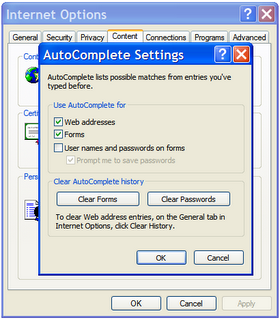
To disable this feature:
To disable this feature:
- Open Internet Explorer.
- From the Tools menu, select 'Internet Options...'.
- Select the Content tab.
- Press the AutoComplete... button
- Uncheck the 'User names and passwords on forms' checkbox.
- Press the 'Clear Passwords' button.
- Press the 'OK' buttons (three times).

No comments:
Post a Comment